There is a misconception floating around the SEO world right now. Some marketers believe that because artificial intelligence is changing search, on-page optimization no longer matters as much as it used to.
The argument goes that Google is now smart enough to understand content regardless of how it is structured, so spending hours on title tags, headings, and page speed is no longer necessary.
This argument is wrong, and the data proves it.
Google performs an average of nine to ten algorithm updates every single day. Its March 2026 Core Update alone caused nearly 80 percent of top-three search results to shift positions.
Sites that survived and improved were the ones with strong on-page fundamentals, correct intent matching, clear structure, genuine expertise, and fast page experiences. Sites that dropped were those relying on thin content, poor structure, or the assumption that AI would figure things out for them.
On-page SEO involves optimizing your web page content, HTML tags, and structure to rank higher in search engines and attract relevant organic traffic. Learn proven techniques to boost visibility and improve your search rankings.
That on-page SEO has become more nuanced and more demanding, not less important. Google’s AI systems do not replace the need for well-optimized pages, they actually raise the standards for what a well-optimized page looks like.
What Is On-Page SEO?
On-page SEO refers to all the optimization work you do directly on your website pages to help search engines understand what those pages are about, determine their quality, and decide where to rank them.
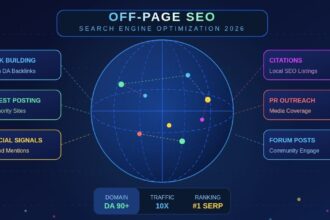
Unlike off-page SEO, which involves things outside your control like backlinks and brand mentions, on-page SEO is entirely within your hands.
You decide what the title of your page says. You decide how the content is structured. You decide how fast the page loads and how it looks on a mobile screen.
This control is what makes on-page SEO so valuable. When you get it right, you give search engines every possible signal to rank you well. When you get it wrong, even the best backlink profile in the world cannot fully compensate.
On-page SEO covers a wide range of elements, which we will walk through one by one in this guide:
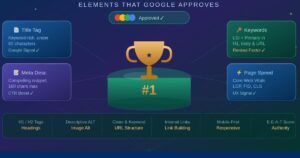
- Title tags and meta descriptions
- Heading structure and content organization
- Keyword research and search intent matching
- URL structure
- Image optimization
- Internal linking
- Core Web Vitals and page experience
- Structured data and schema markup
- Content quality and E-E-A-T signals
- Mobile optimization
- AI-era considerations including Answer Engine Optimization
1: Understanding Search Intent Before You Write Anything
Before you touch a single on-page element, you need to understand why someone is searching for your target keyword. This is called search intent, and it is the single most important factor in on-page SEO today.
Google has become exceptionally good at identifying what users actually want when they type a query. If your page does not match that intent precisely, no amount of technical optimization will get it to rank well.
There are four main types of search intent:
Informational intent, the user wants to learn something. Examples: “how does compound interest work,” “what is on-page SEO,” “why do dogs pant.” These searchers are looking for explanations, guides, and educational content.
Navigational intent: the user wants to reach a specific website or page. Examples: “Gmail login,” “YouTube homepage,” “Amazon orders.” These searches are not usually your target unless you are the brand being searched.
Commercial investigation intent: the user is researching before making a decision. Examples: “best project management software,” “SEMrush vs Ahrefs comparison,” “top running shoes for flat feet.” These searchers want reviews, comparisons, and recommendations.
Transactional intent: the user is ready to take action. Examples: “buy iPhone 16 Pro,” “sign up for Shopify free trial,” “download Grammarly.” These pages need clear calls to action and conversion-focused content.
The format you use, and the information you include must all align with the dominant intent behind your target keyword. If someone searches for “how to do on-page SEO” and you send them to a product page, Google will recognize the mismatch and your rankings will suffer.
Practical step: Before writing any page, search your target keyword yourself. Look at the top five results. Are they guides, videos, list articles, or comparison pages? That tells you exactly what format Google considers most appropriate for that query.
2: Title Tags: Your Single Most Controllable Ranking Factor
Your title tag is the headline that appears in search results and in the browser tab. It is the most direct on-page signal you can give Google about what your page covers.
Best practices for title tags are clear and backed by data:
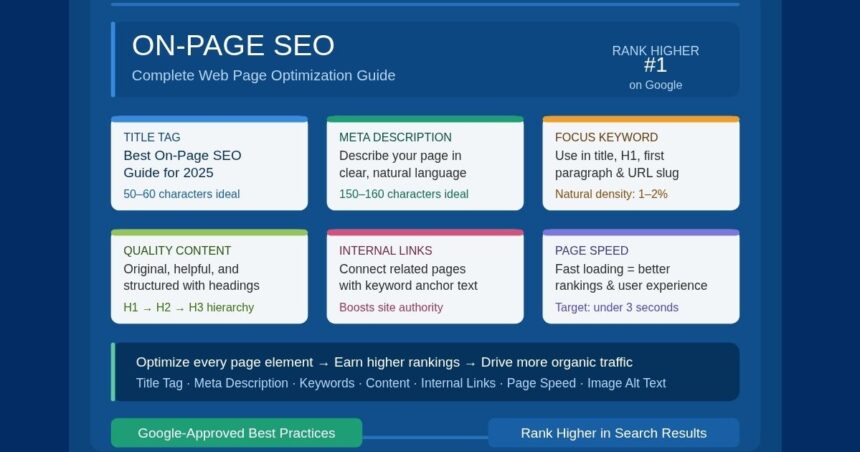
Keep your title between 50 and 60 characters. Anything longer gets cut off in search results, which makes your listing look incomplete and reduces click-through rates. Anything significantly shorter misses the opportunity to communicate fully.
Place your primary keyword near the beginning. Research consistently shows that keywords positioned earlier in the title correlate with stronger rankings. This is partly algorithmic and partly because users scanning search results naturally pay more attention to the first words they see.
Make every title tag on your site completely unique. Duplicate title tags confuse search engines about which page should rank for a given query, split your ranking potential, and waste crawl resources. Each page needs its own distinct title.
Write for humans first, algorithms second. A title that contains your keyword but reads unnaturally or makes no sense to a real person will get fewer clicks even if it ranks. Clicks and engagement signals feed back into your rankings over time.
Use power words and modifiers when appropriate. Words like “complete,” “guide,” “2026,” “proven,” and “step-by-step” increase click-through rates by setting clear expectations and signaling fresh, relevant content.
Example of a weak title tag:
On-Page SEO – SEO Tips and Tricks
Example of a strong title tag:
On-Page SEO: The Complete Practical Guide for 2026
Google rewrites title tags it considers misleading, keyword-stuffed, or mismatched to the page content. If you see your title appearing differently in search results than what you wrote, that is Google’s way of telling you your original title was not accurately representing the page. Fix the page, not just the title.
3: Meta Descriptions: Your Billboard on the Search Results Page
Meta descriptions do not directly determine your ranking position, but they have a powerful indirect effect through click-through rate. A well-written description convinces the right user to click your result. More clicks from satisfied users tell Google that your page is delivering on its promise, which stabilizes and improves rankings over time.
There is an additional reason meta descriptions matter more than ever: AI-powered search features often pull summary text directly from your opening paragraph or meta description when constructing AI Overview answers. A clear, well-structured description increases the chance that your page gets cited in these features.
Write descriptions between 120 and 160 characters. Mobile screens truncate descriptions earlier than desktop, so front-load the most important information.
Include your primary keyword naturally. Google bolds keywords in descriptions when they match the search query, which visually draws attention to your result.
Communicate a clear, specific benefit. Tell the user exactly what they will get from clicking. Vague descriptions like.
Misleading descriptions inflate your click-through rate temporarily but increase your bounce rate, which hurts rankings over time. Accuracy builds the kind of sustained engagement that search engines reward.
Avoid using the same meta description across multiple pages. Like title tags, unique descriptions are essential for helping search engines and users distinguish between your pages.
4: Heading Structure: The Architecture of Your Content
Headings (H1 through H6) give your page a clear hierarchy that both humans and search engines rely on. Think of them as the table of contents for your page. A well-organized heading structure makes a complex page navigable, signals to Google what the main topics and subtopics are, and improves the reading experience for your audience.
The H1 tag is your page title: use only one per page. The H1 should state the primary topic of the page and naturally include your main keyword. It should match the intent of the page and set accurate expectations for what follows.
H2 tags are your main sections. Each major topic covered on the page should have its own H2. These are the primary organizing units of your content. Aim for H2s that answer distinct questions or cover distinct aspects of the main topic.
H3 tags are subsections within H2 sections. Use them when a section has multiple components worth distinguishing. Do not use H3s just to break up long paragraphs — use them when the content genuinely divides into distinct sub-points.
Do not skip heading levels. Going from H2 directly to H4 is messy for both accessibility tools and search engine crawlers. Maintain the logical hierarchy.
Include related keywords in your headings naturally. Your H2 and H3 headings are an excellent place to include secondary keywords and semantic variations of your main keyword. This helps Google understand the full scope of your topic coverage without requiring you to repeat the same phrase throughout the body text.
Google’s AI systems analyze heading structure when deciding whether to include your page in AI Overviews and featured snippet positions. Pages with clear, question-based headings that match common search queries are significantly more likely to be cited in these features.
5: Keyword Research and Placement
Keyword research has not disappeared, it has evolved. In 2026, effective keyword strategy is less about finding one perfect keyword to repeat throughout a page and more about building a thorough topical understanding that naturally incorporates the full range of terms your audience uses.
Start with a primary keyword, then expand to semantic clusters. Your primary keyword is the core topic of the page. Semantic keywords are related terms, synonyms, and connected concepts that together signal to Google that you have covered the topic comprehensively.
A page about “on-page SEO” should naturally include terms like “title tags,” “meta descriptions,” “heading structure,” “internal linking,” “search intent,” and “content optimization” — not because you inserted them artificially, but because a genuinely thorough treatment of the topic includes all of them.
Place your primary keyword in these specific locations:
In the title tag, ideally near the beginning. In the first 100 words of your body content — this remains one of the clearest signals to both search engines and readers that the page is about what it claims to be. In at least one H2 subheading. In the meta description. In the URL slug. In the alt text of the main image, when relevant.
Avoid keyword stuffing entirely. This practice was ineffective years ago and is actively counterproductive in 2026. Google’s natural language processing systems understand context well enough to recognize artificial repetition, and they discount pages that appear to be optimizing for algorithms rather than for readers.
Use keyword research tools to find questions your audience asks. Long-tail keyword phrases, particularly those framed as questions, are increasingly important as voice search and conversational AI queries grow. Phrases like “how do I optimize title tags for SEO” or “what is the best heading structure for blog posts” represent specific, high-intent searches that well-structured content can capture effectively.
6: URL Structure: Small Detail, Real Impact
Your URL is one of the first things Google looks at when crawling a new page. A clean, logical URL structure helps search engines understand what the page is about before they read a single word of the content.
Use hyphens to separate words, not underscores. Google treats hyphens as word separators and underscores as word connectors. on-page-seo reads as three separate words; on_page_seo reads as one connected string.
Include your primary keyword in the URL. This helps both search engines and users understand what the page covers at a glance.
Avoid stop words, dates, and unnecessary parameters. Words like “the,” “a,” “and,” and “for” add length without adding clarity. Dates in URLs make content feel outdated even when it has been updated.
Once a URL is set, avoid changing it.
Changing URLs on established pages breaks any existing backlinks pointing to that page and resets some of the ranking history associated with it. If you must change a URL, set up a permanent 301 redirect from the old address to the new one.
7: Image Optimization: Often Overlooked, Always Important
Images make content more engaging and easier to understand. They also represent a significant opportunity for on-page optimization that many website owners consistently neglect.
Compress every image before uploading. Large image files are one of the most common causes of slow page load times, which directly affects both Core Web Vitals scores and user experience. Use WebP or AVIF formats where possible — these modern formats deliver the same visual quality at significantly smaller file sizes compared to JPEG and PNG.
Write descriptive, keyword-relevant alt text for every image. Alt text serves two purposes: it tells screen readers what an image shows for users with visual impairments, and it tells search engines what the image depicts. Alt text should describe the image accurately and include a relevant keyword when it genuinely fits the context. Do not write alt text that is purely keyword-stuffed with no relation to the actual image.
Name your image files descriptively before uploading. seo-title-tag-example.webp is better than IMG_4921.jpg. The file name is a small signal, but it contributes to the overall relevance picture.
Include captions when they add value. Captions are often the most-read text on a page after headings.
When a caption can add context or include a natural keyword reference, it is worth writing.
Use responsive images. Images should scale appropriately across screen sizes. Serving massive desktop images to mobile users wastes bandwidth, slows load times, and hurts rankings since Google uses mobile-first indexing.
8: Internal Linking: The Overlooked Powerhouse of On-Page SEO
Internal links are hyperlinks that connect one page on your website to another page on the same website. They are consistently underutilized by website owners, despite being one of the most powerful on-page optimization tools available.
Internal links do three important things. First, they distribute ranking authority (often called PageRank or link equity) across your site. When a page has strong backlinks from external sites, that authority can flow to other pages through internal links. Second, they help search engine crawlers discover and index your pages. Third, they guide users to related content that extends their visit and deepens their engagement with your site.
Link from high-authority pages to pages that need a ranking boost. If you have a popular, well-linked page on your site, adding internal links from that page to newer or less-trafficked pages helps those pages get discovered and builds their authority.
Use descriptive, relevant anchor text. Just as external backlinks benefit from keyword-relevant anchor text, internal links work better when the clickable text describes the destination page’s topic. “Read our guide to keyword research” is far more useful than “click here.”
Link to topically related content. When you are writing a page about on-page SEO, linking to your pages about title tags, content strategy, and technical SEO creates a network of topically related pages. Google uses these clusters to understand your site’s authority on a given subject.
Audit your internal links regularly. Pages that have no internal links pointing to them are difficult for Google to find and have no inherited authority. In an audit, look for orphaned pages (pages with no internal links pointing to them) and connect them logically to related content.
Aim for at least two to five contextual internal links per article, depending on length. More is fine as long as each link is genuinely relevant and useful to the reader.
9: Core Web Vitals and Page Experience
Google made Core Web Vitals official ranking signals in 2021, and their importance has grown every year since. In 2026, page experience optimization is no longer optional — it is a fundamental requirement for competitive rankings.
Core Web Vitals measure three specific aspects of the user experience on your pages:
Largest Contentful Paint (LCP) measures how long it takes for the largest visible element on the page — typically a hero image or heading — to fully load. Google’s threshold for a “good” LCP score is under 2.5 seconds. LCP is largely determined by server response time, image sizes, and how efficiently your page loads resources.
Interaction to Next Paint (INP) replaced First Input Delay in 2024 and measures how quickly your page responds to user interactions like clicks and taps. A good INP score is under 200 milliseconds. Heavy JavaScript, bloated plugins, and inefficient code are common causes of poor INP scores.
Cumulative Layout Shift (CLS) measures visual stability — how much the page elements move around as the page loads. A CLS score of under 0.1 is considered good. Layout shifts happen when images without defined dimensions load and push text around, or when ads or embeds pop in unexpectedly and disrupt reading.
Why these metrics matter beyond rankings: Sites that improve Core Web Vitals from poor to good scores have reported measurable increases in conversions and significant reductions in bounce rates. Page experience directly affects whether visitors stay, engage, and convert — not just whether they arrive.
How to check your scores: Google Search Console’s Core Web Vitals report shows your real-world performance data. Google’s PageSpeed Insights tool provides both lab data and field data along with specific recommendations for improvement.
Google to continue refining these metrics and potentially introduce additional page experience signals. The direction is clear: pages that load fast, respond instantly, and remain visually stable will continue to be rewarded.
10: Content Quality and E-E-A-T: The Foundation Everything Else Rests On
All the technical optimization in the world cannot compensate for content that is thin, inaccurate, unhelpful, or generic. Content quality is the foundation that every other on-page element is built upon.
Google evaluates content quality through a framework known as E-E-A-T, which stands for Experience, Expertise, Authoritativeness, and Trustworthiness. This framework has become increasingly central to how Google assesses content, particularly after its major helpful content updates.
Experience means demonstrating real, first-hand engagement with the topic. Have you actually used the product you are reviewing? Have you personally implemented the strategy you are writing about? Content that reflects genuine experience is different in quality and specificity from content that simply aggregates information from other sources.
Expertise means demonstrating a deep, accurate understanding of the subject. For technical topics, this means getting the details right, addressing nuances, and providing insights that go beyond surface-level coverage.
Authoritativeness means being recognized by others in your field as a credible source. This is partly built through backlinks and mentions, but it is also reflected in the depth and accuracy of your content.
Trustworthiness means your site and content can be relied upon. Clear authorship, accurate information, proper citations, privacy policies, contact information, and transparent business practices all contribute to trust signals.
Practical ways to demonstrate E-E-A-T on your pages:
Display author names and brief author bios on article pages. Link to credible, authoritative sources when citing data or making factual claims. Include original examples, case studies, or data from your own experience. Update older content regularly to ensure accuracy. Make your About page, contact information, and business details easy to find. Use a professional, well-maintained website design that does not look spammy.
The most consistent signal of low-quality content is writing that tries to serve everyone and ends up serving no one. Know who your reader is, what they know, what they want to accomplish, and what questions they need answered. Write directly to that person.
Cover topics comprehensively but without padding. A long article is not automatically better than a short one. What matters is that your content covers the topic thoroughly enough to answer the reader’s question without requiring them to visit another site to fill in gaps. Padding content with filler text to reach an arbitrary word count actively hurts quality.
11: Structured Data and Schema Markup
Structured data is code you add to your pages that helps search engines understand specific attributes of your content in a standardized format. It is implemented using a vocabulary called Schema.org and is typically written in JSON-LD format, which Google recommends.
Structured data does not directly improve rankings, but it unlocks rich results in search, enhanced displays that include star ratings, review counts, frequently asked questions, how-to steps, event details, product prices, and more. These rich results occupy more space in search results and consistently generate higher click-through rates than standard listings.
The most valuable schema types for most websites include:
Article schema for blog posts and news articles. FAQ schema for pages that contain question-and-answer sections. HowTo schema for tutorial and instructional content. Review and AggregateRating schema for product and service pages. BreadcrumbList schema for navigation context. Organization schema for your company information on your homepage.
Implementing schema correctly matters. Inaccurate structured data — data that does not match the visible content on the page — can result in manual actions from Google. Always ensure your structured data reflects exactly what users can see.
Structured data is also becoming more relevant for AI search features. Pages with clear, valid structured data are more easily parsed by AI systems, increasing the likelihood of being cited in AI Overviews and conversational search responses.
12: Mobile Optimization: Non-Negotiable in Every Year Forward
Google has used mobile-first indexing since 2020, meaning it uses the mobile version of your website as the primary version it crawls and evaluates for ranking. This is not going to change, mobile traffic continues to grow globally, and Google’s mobile-first approach reflects that reality.
Use responsive design. Your website should automatically adapt its layout to fit the screen size of the device viewing it. Separate mobile and desktop URLs are outdated and create unnecessary complexity.
Make tap targets large enough. Buttons and links on mobile screens need to be large enough to tap accurately without hitting neighboring elements. Google recommends tap targets of at least 48 by 48 pixels.
Ensure text is readable without zooming. Mobile users should not need to pinch and zoom to read your content. Use font sizes of at least 16 pixels for body text.
Avoid intrusive interstitials. Full-screen popups that block content immediately on page load are penalized by Google, particularly on mobile. If you use popups, configure them to appear only after a delay or on exit intent.
Test your mobile experience regularly. Google Search Console includes a mobile usability report that identifies specific issues across your pages. Google’s mobile-friendly test tool provides immediate feedback on any URL.
13: Optimizing for AI Search in 2026 and Beyond
This section covers what is genuinely new in on-page SEO, the adaptations required to remain visible as AI transforms how search engines display information.
Google’s AI Overviews now appear at the top of results for a growing percentage of queries, providing synthesized answers before users even see traditional search listings. Research shows that AI Overviews reduce click-through rates on the results below them significantly.
Pages that are cited within AI Overviews can receive high-quality referral traffic even from a prominent, featured position.
To improve your chances of being cited in AI Overviews and similar AI search features:
Structure your content to directly answer specific questions. Pages that begin with a clear, concise answer to the primary question and then expand into detail are much more likely to be featured. Research shows that 44 percent of AI citations come from the first 30 percent of a page’s text, which means your introduction and early sections are critically important.
Use clear, simple language that AI systems can easily extract and summarize. Jargon-heavy or poorly structured writing is less likely to be selected as a citation source.
Build content depth. AI systems prioritize pages that cover topics thoroughly. Surface-level articles with limited detail are increasingly overlooked in favor of comprehensive resources.
Earn reviews and build your review profile. Research in 2026 shows that review profiles correlate with significantly higher AI citation rates across platforms. Encouraging satisfied customers or readers to leave reviews builds a trust signal that AI systems recognize.
Optimize for topical authority, not just individual pages. Sites that consistently publish high-quality content on a specific subject cluster develop a recognized authority in that area that influences how AI systems view and cite them.
14: A Complete On-Page SEO Checklist for Every Page You Publish

Use this checklist as a practical quality control step before publishing any page:
Title and Meta
- Title tag between 50 and 60 characters with primary keyword near the start
- Unique title not duplicated anywhere on the site
- Meta description between 120 and 160 characters with clear benefit statement
- Unique meta description for this page
Content and Structure
- One H1 that states the primary topic and includes main keyword
- Logical H2 and H3 structure covering the topic comprehensively
- Primary keyword appears naturally in the first 100 words
- Semantic and related keywords appear throughout without stuffing
- Content genuinely covers the topic better than current ranking pages
- Author name and bio included for credibility
URL and Links
- URL is short, descriptive, and includes primary keyword
- Hyphens used between words in URL slug
- Two to five contextual internal links to related pages
- Outbound links to credible sources where claims are made
Images and Media
- All images compressed and in WebP or AVIF format where possible
- Descriptive alt text on every image
- Image file names are descriptive and relevant
- Images display correctly on mobile screens
Technical
- Page loads in under three seconds (check with PageSpeed Insights)
- LCP, INP, and CLS scores all in “good” range
- Page renders correctly on mobile devices
- Structured data implemented and validated where applicable
- Canonical tag pointing to the correct version of the page
Intent and Quality Check
- Content format matches what currently ranks for the target keyword
- Page answers the reader’s question without requiring them to visit elsewhere
- No thin sections used purely for length
- Information is accurate and up to date
On-Page SEO Through
On-page SEO will remain stable. Title tags, meta descriptions, content quality, page speed, and internal linking will continue to matter as long as Google remains the dominant search engine. These elements are not going away.
The standards applied to each element and the context in which they operate.
AI-powered search will become more prominent. The percentage of queries answered directly by AI features will grow. This shifts the goal of on-page SEO from “rank in position one” to “be the source that AI cites.” The pages that get cited are comprehensive, clearly structured, demonstrably authoritative, and technically accessible.
Google has consistently moved toward rewarding pages that provide genuine satisfaction to the users who visit them.
Page speed, readability, accurate expectations set by titles and descriptions, and content that actually answers questions are all experience factors that will grow in importance.
Topical authority will matter more than individual page optimization. A single well-optimized page in isolation performs reasonably well. A network of well-optimized, topically related pages that together signal deep expertise in a subject performs far better.
Building out complete topic clusters — where every major question in your niche is answered comprehensively on your site — is the sustainable long-term strategy.
Brand signals will increasingly influence rankings. Sites that are mentioned across the web, reviewed positively, and recognized as authoritative by external sources are more resistant to algorithm volatility. On-page SEO contributes to brand authority by consistently delivering quality experiences that generate positive signals.
Final Thoughts: The Mindset That Makes On-Page SEO Work
Every on-page SEO technique in this guide comes back to the same underlying principle: create pages that serve your readers better than any competing page does, and make them easy for search engines to understand and trust.
This has always been the core of good on-page SEO. What changes over time is the precision required, the technical standards that must be met, and the sophistication of the systems evaluating your work.
If you approach every page you publish by asking “does this genuinely answer what my reader needs, is it technically sound, and is it easy to navigate” you will make the right decisions on title tags, headings, internal links, images, and everything else almost automatically.
Start with the checklist above. Apply it consistently. Return to update your most important pages at least every six months to ensure the content remains current and accurate. Track your performance in Google Search Console and respond to what the data tells you.