Every second, Google processes more than 99,000 search queries.
That is 8.5 billion searches per day and every single one of them triggers a powerful, complex, AI-enhanced algorithm that decides which websites appear at the top and which ones stay buried on page 10.
If you own a website, a blog, or a business online, understanding how search engines work is not optional anymore. It is the foundation of your entire digital growth strategy.
We break down exactly how search engines work in 2026, including Google’s latest AI-powered updates, the newest ranking factors, and step-by-step advice to help your website rank higher, get more traffic, and qualify for Google AdSense.
Search engines work by crawling billions of pages using web crawlers (spiders or bots) that follow links to discover new content. Pages are then indexed and ranked by Google’s algorithm using 200+ signals including E-E-A-T, backlinks, and Core Web Vitals
What Is a Search Engine?
A search engine is an online software system that helps people find information on the internet by searching through a giant database of web pages.
When you type something into Google and press Enter, you are not searching the live internet in real time. You are searching Google’s pre-built index — a massive database of billions of web pages that Google has already collected, analyzed, and stored.
Search engine is a system that helps users find information across billions of web pages by matching their queries to the most relevant, trustworthy content available.
The Most Popular Search Engines:
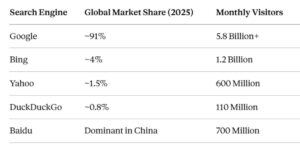
Google dominates by a massive margin. That is why SEO is primarily focused on understanding and satisfying Google’s algorithm.
What About AI Search Engines
New AI-powered tools like ChatGPT Search, Perplexity AI, and Google’s AI Overviews are changing the search landscape. These tools use large language models (LLMs) to give direct, conversational answers instead of just a list of links.
Traditional search engines still dominate. ChatGPT.com received around 651 million visitors per month in early 2026 impressive, but still a fraction of Google’s 5.8 billion. We cover AI search in detail later in this guide.
How Search Engines Work:
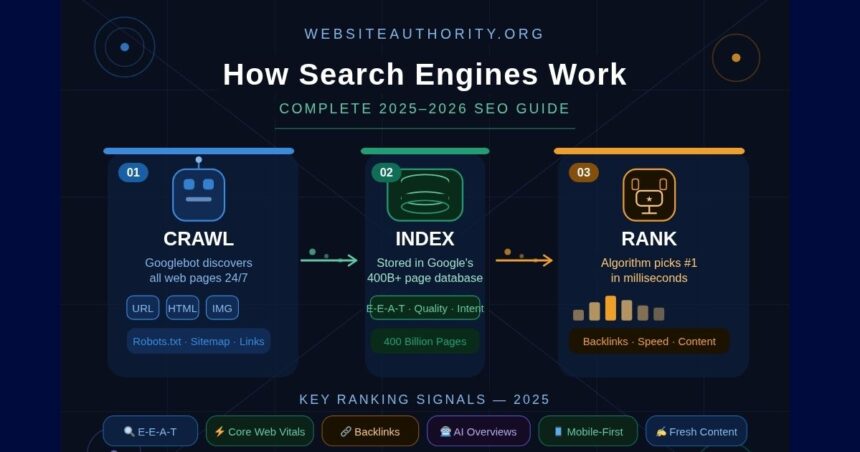
Search engines follow a clear three-step process to deliver results:
CRAWL → INDEX → RANK
Crawl : Bots discover and download web pages
Index : Pages are analyzed and stored in a database
Rank : An algorithm decides which pages appear first for each query
This process runs continuously, 24 hours a day, 7 days a week. It is how search engines keep up with the billions of new and updated pages published on the web every single day.
Crawling : How Bots Discover Your Website
What Is Web Crawling?
Crawling is the process by which search engines discover content on the internet. Search engines use automated programs called bots, spiders, or crawlers to browse the web systematically.
Google’s main crawler is called Googlebot. Bing uses Bingbot. These bots work around the clock, visiting billions of web pages every day.
How Does Googlebot Work?
Googlebot starts with a list of known URLs — pages it has visited before or pages discovered through sitemaps. From each page, it follows links to find new pages. This process of following links from one page to another is how the entire web gets mapped.
Googlebot is like a librarian walking through a massive library, reading every book, writing down every page, and following every footnote to find new books.
During crawling, Googlebot downloads:
- Text content (paragraphs, headings, lists)
- Images and videos
- Internal and external links
- HTML structure and metadata
- Page load speed signals
- Schema markup and structured data
What Affects How Often Google Crawls Your Site?
Google does not crawl every website equally. Factors that influence crawl frequency include:
- Domain authority: Established, trusted sites get crawled more often
- Update frequency: Sites that publish new content regularly get revisited more
- Internal linking : Pages with more internal links are easier to discover
- Sitemap submission: Submitting a sitemap through Google Search Console helps Googlebot find all your pages
- Server speed: Slow servers cause Googlebot to crawl less aggressively (called “crawl budget” management)
What Can Block Googlebot From Crawling Your Site?
Some technical issues prevent search engine bots from accessing your content:
- Robots.txt file: If misconfigured, this can block Googlebot entirely
- Noindex tags: These tell search engines not to index a page
- JavaScript-heavy sites: Content loaded purely by JavaScript can be missed
- Broken internal links: Orphaned pages with no links pointing to them may never get crawled
- Slow page speed: Can cause Googlebot to stop crawling mid-session
Use Google Search Console (free) to monitor your crawl coverage. It shows exactly which pages Google has found, indexed, or skipped and why.
Indexing: How Google Stores Your Content
What Is Indexing?
Once Googlebot crawls a page, it sends the data back to Google’s servers for indexing. Indexing is the process of analyzing, understanding, and storing that page in Google’s massive searchable database — called the Google Index.
Google Index is estimated to contain over 400 billion web pages. Every time someone searches on Google, the algorithm searches through this index to find the best results.
What Happens During Indexing?
During the indexing process, Google’s systems analyze your page to understand:
- The main topic What is this page primarily about?
- Keywords and entities: What specific terms, names, and concepts appear?
- Content quality: Is this content original, helpful, and well-written?
- E-E-A-T signals: Does the author or website show Experience, Expertise, Authoritativeness, and
- Trustworthiness?
- Structured data: Does the page use schema markup to clarify its content type?
- Mobile-friendliness: Does the page work properly on smartphones?
- Core Web Vitals: How fast does the page load? Is it visually stable?
- Duplicate content: Is this page too similar to another page already in the index?
What Pages Does Google NOT Index?
Google may skip indexing a page if:
- It has a noindex meta tag
- It has very thin or duplicate content
- It is blocked by robots.txt
- The page has no inbound links (no way for Googlebot to find it)
- It is loading too slowly
- The content is low-quality or spammy
Being crawled does NOT guarantee being indexed. Your page must pass Google’s quality threshold to be added to the index. This is why content quality is so important for SEO.
How to Check If Your Page Is Indexed
You can check whether any page is in Google’s index by searching:
site:yourwebsite.com/your-page-url
Ranking — How Google Decides Who Ranks #1
What Is Search Ranking?
Ranking is the most complex step. Once your page is indexed, Google must decide how to rank it among thousands of other pages that target the same keywords.
When someone searches for “how search engines work,” Google’s algorithm evaluates every page in its index that is relevant to that query and assigns each one a ranking position, all within milliseconds.
What Does Google’s Algorithm Actually Do?
Google’s ranking algorithm considers hundreds of signals simultaneously. These signals fall into several major categories:
1. Query Understanding
Google analyzes the intent behind your search. Are you looking for information? Trying to buy something? Searching for a specific website? This is called Search Intent, and matching it correctly is critical for ranking.
2. Relevance
How closely does the page content match the search query? Google looks at keywords, related terms, headings, body content, image alt text, and more.
3. Quality
The content helpful, original, and trustworthy? Google’s Helpful Content System (introduced in 2022 and greatly expanded in 2024) actively demotes content written primarily for search engines rather than for humans.
4. Page Experience
Does the page load fast? Is it mobile-friendly? Does it feel stable when loading (no layout shifts)? These are measured by Google’s Core Web Vitals.
5. Backlinks
How many other reputable websites link to this page? Backlinks remain one of the strongest ranking signals. A link from a trusted site is essentially a vote of confidence.
6. Freshness
For time-sensitive topics, recently updated content ranks better. Google favors fresh content for queries like “best smartphones 2025” or “latest SEO tips.”
7. User Signals
Google monitors how users interact with search results, do they click your result and stay, or do they quickly return to Google (called “pogo-sticking”)? While Google denies using some behavioral signals directly, user satisfaction is deeply baked into the algorithm through training data.
Google’s Algorithm Updates:
Google makes thousands of small algorithm changes each year, plus several major “Core Updates.” Here are the most important developments heading into 2025–2026:
1. AI Overviews
Google’s AI Overviews (formerly Search Generative Experience) now appears on a large percentage of search queries. These AI-generated summaries appear at the very top of search results, pulling information from multiple sources. To be cited in AI Overviews, your content needs to be highly authoritative and clearly structured.
2. Helpful Content System Update
Google’s algorithm now actively identifies and demotes “unhelpful” content — pages that exist primarily to rank rather than to genuinely help readers. Websites that publish thin, AI-generated spam have faced severe ranking drops.
3. E-E-A-T Elevation
E-E-A-T (Experience, Expertise, Authoritativeness, Trustworthiness) is now a core component of Google’s quality evaluation. In 2025, first-hand Experience (the first E) carries more weight than ever. Having author bios, real credentials, and original research on your page helps significantly.
4. Core Web Vitals as a Ranking Signal
Google’s three Core Web Vitals metrics are now active ranking signals:
- LCP (Largest Contentful Paint) — How fast does the main content load? Target: under 2.5 seconds
- FID/INP (Interaction to Next Paint) — How responsive is the page to user input? Target: under 200ms
- CLS (Cumulative Layout Shift) — How visually stable is the page? Target: under 0.1
5. SGE and Zero-Click Searches
AI-powered answer boxes mean more searches are being answered directly on the results page, without users clicking any website. This makes long-tail keywords, featured snippets, and AI Overview citations more important than ever for driving actual traffic.
Top Google Ranking Factors
The most important ranking factors you need to understand right now:
1. Content Quality and Helpfulness
This is the single most important factor. Google’s algorithms are now very good at distinguishing genuinely helpful content from keyword-stuffed fluff. Your content must:
- Thoroughly answer the user’s question
- Include original insights or first-hand experience
- Be written for humans first, search engines second
- Cover the topic more completely than competing pages
2. Keyword Optimization
Strategic use of keywords still matters — but in a natural, contextual way
- Include your primary keyword in the title tag, H1 heading, and first paragraph
- Use semantic keywords (related terms) throughout the content
- Structure content with clear H2 and H3 subheadings
O - timize your meta description (not a ranking factor but improves click-through rate)
3. Backlinks (Still Critical)
Backlinks from authoritative, relevant websites remain one of the strongest ranking signals. Quality matters far more than quantity one link from a trusted news site outweighs 100 links from low-quality directories.
- Create original research and data-driven content
- Write guest posts on reputable industry sites
- Get listed in directories and resource pages
- Create visual content (infographics) others want to share
4. Mobile-First Indexing
Google now uses the mobile version of your website as the primary version for indexing and ranking. If your mobile experience is poor, your rankings will suffer even for desktop searches.
5. Page Speed and Core Web Vitals
As covered above, page speed is a confirmed ranking factor. Use Google’s PageSpeed Insights tool (free) to audit your site and fix performance issues.
6. E-E-A-T Signals
Demonstrate real expertise on your topic through:
- Author bio pages with credentials
- About page that clearly explains who runs the site
- Citations and links to authoritative sources
- Regular content updates with accurate, current information
7. Search Intent Match
Your content must match what users actually want when they search a query. There are four types of search intent:
- Informational — The user wants to learn something (“how do search engines work”)
- Navigational — The user wants to find a specific site (“Google Search Console login”)
- Commercial — The user is researching before buying (“best SEO tools “)
- Transactional — The user is ready to buy (“buy Semrush subscription”)
8. Internal Linking Structure
Strong internal linking helps Google understand your site’s structure and passes authority from one page to another. A well-planned internal link network can significantly boost rankings across your entire site.
9. Structured Data (Schema Markup)
Adding schema markup to your pages helps Google understand your content better and can earn rich results (star ratings, FAQ dropdowns, recipe cards) that dramatically increase click-through rates.
10. Content Freshness
Regularly updating your content with new information, updated statistics, and current examples signals to Google that your site is active and trustworthy. Pages that go years without updates often slowly lose rankings.
How to Optimize Your Website for Search Engines
Now that you understand how search engines work, here is a practical roadmap to improve your website’s rankings:
1: Technical SEO Foundation
- Submit your sitemap to Google Search Console
- Fix crawl errors shown in Search Console
- Improve page speed — aim for a Lighthouse score above 80
- Ensure mobile-friendliness — test with Google’s Mobile-Friendly Test
- Set up HTTPS — Google requires a secure connection
- Fix broken links — both internal and external
- Optimize Core Web Vitals — focus on LCP, INP, and CLS
2: On-Page SEO
- Write unique, descriptive title tags (50–60 characters) for every page
- Write compelling meta descriptions (150–160 characters)
- Use one H1 tag per page — make it clear and keyword-focused
- Structure content with H2 and H3 subheadings
- Include primary keyword in the first 100 words of the page
- Add alt text to all images
- Use internal links to connect related pages
- Add structured data relevant to your content type
3: Content Strategy
- Research keywords your target audience is searching for
- Create comprehensive, long-form content on topics relevant to your niche
- Build content clusters — a pillar page on a broad topic, supported by detailed subtopic pages
- Update old content regularly with fresh information
- Include original data, examples, or expert quotes to demonstrate E-E-A-T
4: Link Building
- Guest post on reputable blogs in your industry
- Create linkable assets — original research, tools, templates, infographics
- Get listed in relevant directories and resource pages
- Build relationships with other website owners and content creators
5: Monitoring and Iteration
- Track your rankings weekly using a tool like Semrush, Ahrefs, or Google Search Console
- Analyze your traffic in Google Analytics — which pages get visits, which lose traffic?
- Watch for algorithm updates — follow Google’s Search Status Dashboard
- Iterate based on data — what works, do more of; what does not, fix or remove
Common SEO Mistakes That Hurt Rankings
Avoid these mistakes that commonly prevent websites from ranking well:
1. Publishing Thin Content
Short, shallow articles that barely cover a topic will not rank. Google rewards depth, completeness, and genuine value.
2. Keyword Stuffing
Cramming keywords artificially into your content makes it unreadable and gets your site penalized. Write naturally and let keywords appear where they fit.
3. Ignoring Mobile Users
With over 60% of searches happening on mobile, a poor mobile experience will actively hurt your rankings.
4. Buying Low-Quality Backlinks
Spammy backlinks from link farms can result in a Google penalty that tanks your entire site’s rankings.
5. Duplicate Content
Copying content from other websites — or having the same content appear on multiple pages of your own site — confuses Google and can get your pages filtered out of search results.
6. Neglecting Page Speed
A page that takes more than 3 seconds to load loses approximately 53% of mobile visitors. Slow sites rank lower and convert less.
7. Ignoring Search Intent
Publishing information content for transactional keywords (or vice versa) will rarely rank — because Google understands what users actually want.
8. No Internal Linking
Orphaned pages with no internal links pointing to them may never get indexed. Build a strong internal link structure from day one.
FAQs:
How long does it take for a new website to rank on Google?
Most new websites take 3 to 6 months to start ranking for competitive keywords. Some less competitive keywords can rank within weeks. Building domain authority and earning backlinks over time accelerates this process.
Does Google penalize AI-generated content?
Google does not penalize AI-generated content outright — it penalizes low-quality, unhelpful content regardless of how it was written. High-quality AI-assisted content that is reviewed, edited, and genuinely helpful to readers can rank well.
What is the difference between SEO and SEM?
SEO (Search Engine Optimization) focuses on earning organic (unpaid) rankings. SEM (Search Engine Marketing) includes paid advertising (like Google Ads) as well as organic SEO.
How many backlinks do I need to rank #1?
There is no fixed number. What matters is the quality and relevance of backlinks relative to competing pages. Analyze the top-ranking competitors for your target keyword to understand what you need to beat them.
Does publishing more content help rankings?
Publishing consistently is good, but quality always beats quantity. One exceptional, comprehensive article outperforms ten mediocre ones. Focus on creating content that is genuinely the best resource available on a topic.
What is Google Search Console and should I use it?
Google Search Console is a free tool from Google that shows you exactly how Google sees your website — which pages are indexed, what queries you rank for, and any technical issues. Every website owner should set it up immediately.
How do I qualify for Google AdSense?
To be approved for Google AdSense, your website needs: original, high-quality content; clear navigation; a privacy policy page; sufficient content volume (typically 15–30+ solid articles); and some organic traffic. Avoiding prohibited content and following Google’s webmaster guidelines is essential.
Final Thoughts
Search engines work is the bedrock of any successful online presence.
The fundamentals have not changed: crawl, index, rank. But the sophistication of each step — especially ranking, has reached extraordinary levels. Google’s AI-powered systems can now understand context, intent, expertise, and genuine value better than ever before.
The websites that win in this environment are not the ones gaming the algorithm with tricks. They are the ones building real authority, creating genuinely helpful content, earning real backlinks, and delivering excellent user experiences.
That is what WebsiteAuthority.org is all about, helping you build a website that search engines trust, users love, and Google rewards with long-term, sustainable rankings.